Per's Scheme blog entries
java.lang.Process and java.lang.ProcessBuilder.
However, they're not as convenient as
as the old Bourne shell, or as elegant in composing commands.
If we ignore syntax, the shell's basic model is that a command is a function that takes an input string (standard input) along with some string-valued command-line arguments, and whose primary result is a string (standard output). The command also has some secondary outputs (including standard error, and the exit code). However, the elegance comes from treating standard output as a string that can be passed to another command, or used in other contexts that require a string (e.g. command substitution). This article presents how Kawa solves this problem.
Process is auto-convertable to string
To run a command like date,
you can use the run-process procedure:
#|kawa:2|# (define p1 (run-process "date --utc"))Equivalently you can use the
&`{command}
syntactic sugar:
#|kawa:2|# (define p1 &`{date --utc})
But what kind of value is p1?
It's an instance of gnu.kawa.functions.LProcess,
which is a class that extends java.lang.Process.
You can see this if you invoke toString or call the
write procedure:
#|kawa:2|# (p1:toString)
gnu.kawa.functions.LProcess@377dca04
#|kawa:3|# (write p1)
gnu.kawa.functions.LProcess@377dca04
An LProcess is automatically converted to
a string or a bytevector in a context that requires it.
More precisely, an LProcess
can be converted to a blob
because it implements Lazy<Blob>.
This means you can convert to a string (or bytevector):
#|kawa:9|# (define s1 ::string p1)
#|kawa:10|# (write s1)
"Wed Jan  1 01:18:21 UTC 2014\n"
#|kawa:11|# (define b1 ::bytevector p1)
(write b1)
#u8(87 101 100 32 74 97 110 ... 52 10)
However the display procedure prints it in "human" form,
as a string:
#|kawa:4|# (display p1)
Wed Jan  1 01:18:21 UTC 2014
This is also the default REPL formatting:
#|kawa:5|# &`{date --utc}
Wed Jan  1 01:18:22 UTC 2014
Command arguments
The general form for run-process is:
(run-process keyword-argument... command)
The command is the process command-line. It can be an array of strings, in which case those are used as the command arguments directly:
(run-process ["ls" "-l"])The command can also be a single string, which is split (tokenized) into command arguments separated by whitespace. Quotation groups words together just like traditional shells:
(run-process "cmd a\"b 'c\"d k'l m\"n'o")
   ⇒ (run-process ["cmd"   "ab 'cd"   "k'l m\"no"])
Using string templates is more readable as it avoids having to quote quotation marks:
(run-process &{cmd a"b 'c"d k'l m"n'o})
You can also use the abbreviated form:
&`{cmd a"b 'c"d k'l m"n'o}
This syntax is the same as
of SRFI-108 named quasi-literals.
In general, the following are roughly equivalent
(the difference is that the former does smart quoting of embedded expressions,
as discussed later):
&`{command}
(run-command &{command})
Similarly, the following are also roughly equivalent:
&`[keyword-argument...]{command}
(run-command keyword-argument... &{command})
A keyword-argument can specify various properties of the process. For example you can specify the working directory of the process:
(run-process directory: "/tmp" "ls -l")You can use the
shell keyword to
specify that we want to use the shell to
split the string into arguments.
For example:
(run-process shell: #t "command line")is equivalent to:
(run-process ["/bin/sh" "-c" "command line"])You can can also use the abbreviation
&sh:
&sh{rm *.class}
which is equivalent to:
&`{/bin/sh -c "rm *.class"}
In general, the abbreviated syntax:
&sh[args...]{command}
is equivalent to:
&`[shell: #t args...]{command}
Command and variable substitution
Traditional shells allow you to insert the output from a command into the command arguments of another command. For example:echo The directory is: `pwd`The equivalent Kawa syntax is:
&`{echo The directory is: &`{pwd}}
This is just a special case of substituting the result from evaluating an expression. The above is a short-hand for:
&`{echo The directory is: &[&`{pwd}]}
In general, the syntax:
...&[expression]...evaluates the
expression,
converts the result to a string, and combines it with the literal string.
(We'll see the details in the next section.)
This general form subsumes command substitution,
variable substitution, and arithmetic expansion.
Tokenization of substitution result
Things gets more interesting when considering the interaction between substitution and tokenization. This is not simple string interpolation. For example, if an interpolated value contains a quote character, we want to treat it as a literal quote, rather than a token delimiter. This matches the behavior of traditional shells. There are multiple cases, depending on whether the interpolation result is a string or a vector/list, and depending on whether the interpolation is inside a quotes.
- If the value is a string, and we're not inside
quotes, then all non-whitespace characters (including quotes) are literal,
but whitespace still separates tokens:
(define v1 "a b'c ") &`{cmd x y&[v1]z} ⟾ (run-process ["cmd" "x" "ya" "b'c" "z"]) - If the value is a string, and we are inside
single quotes, all characters (including whitespace) are literal.
&`{cmd 'x y&[v1]z'} ⟾ (run-process ["cmd" "x ya b'c z"])Double quotes work the same except that newline is an argument separator. This is useful when you have one filename per line, and the filenames may contain spaces, as in the output from
find:&`{ls -l "&`{find . -name '*.pdf'}"}If the string ends with one or more newlines, those are ignored. This rule (which also applies in the previous not-inside-quotes case) matches traditional shell behavior.
- If the value is a vector or list (of strings), and we're
not inside quotes, then each element of the array becomes its own argument,
as-is:
(define v2 ["a b" "c\"d"])
&`{cmd &[v2]}  ⟾  (run-process ["cmd" "a b" "c\"d"])
However, if the enclosed expression is adjacent to non-space non-quote characters, those are prepended to the first element, or appended to the last element, respectively.&`{cmd x&[v2]y} ⟾ (run-process ["cmd" "xa b" "c\"dy"]) &`{cmd x&[[]]y} ⟾ (run-process ["cmd" "xy"])This behavior is similar to how shells handle"$@"(or"${name[@]}"for general arrays), though in Kawa you would leave off the quotes.Note the equivalence:
&`{&[array]} ⟾ (run-process array) -
If the value is a vector or list (of strings), and
we are inside quotes, it is equivalent to interpolating
a single string resulting from concatenating the elements
separated by a space:
&`{cmd "&[v2]"} ⟾ (run-process ["cmd" "a b c\"d"])This behavior is similar to how shells handle
"$*"(or"${name[*]}"for general arrays). -
If the value is the result of a call to
unescaped-datathen it is parsed as if it were literal. For example a quote in the unescaped data may match a quote in the literal:(define vu (unescaped-data "b ' c d '")) &`{cmd 'a &[vu]z'} ⟾ (run-process ["cmd" "a b " "c" "d" "z"]) -
If we're using a shell to tokenize the command,
then we add quotes or backslashes as needed so that
the shell will tokenize as described above:
&sh{cmd x y&[v1]z} ⟾ (run-process ["/bin/sh" "-c" "cmd x y'a' 'b'\\'''c' z'"])
&`{command}.
You can of course use string templates with run-process:
(run-process &{echo The directory is: &`{pwd}})
However, in that case there is no smart tokenization: The template
is evaluated to a string, and then the resulting string is tokenized,
with no knowledge of where expressions were substituted.
Input/output redirection
You can use various keyword arguments to
specify standard input, output, and error streams. For example
to lower-case the text in in.txt, writing
the result to out.txt, you can do:
&`[in-from: "in.txt" out-to: "out.txt"]{tr A-Z a-z}
or:
(run-process in-from: "in.txt" out-to: "out.txt" "tr A-Z a-z")
These options are supported:
in: value- The
valueis evaluated, converted to a string (as if usingdisplay), and copied to the input file of the process. The following are equivalent:&`[in: "text\n"]{command} &`[in: &`{echo "text"}]{command}You can pipe the output from
command1to the input ofcommand2as follows:&`[in: &`{command1}]{command2} in-from:path- The process reads its input from the specified path,
which can be any value coercible to a
filepath. out-to:path- The process writes its output to the specified path.
err-to:path- Similarly for the error stream.
out-append-to:patherr-append-to:path-
Similar to
out-toanderr-to, but append to the file specified by path, instead of replacing it. in-from: 'pipeout-to: 'pipeerr-to: 'pipe- Does not set up redirection.
Instead, the specified stream is available using the methods
getOutputStream,getInputStream, orgetErrorStream, respectively, on the resultingProcessobject, just like Java'sProcessBuilder.Redirect.PIPE. in-from: 'inheritout-to: 'inheriterr-to: 'inherit- Inherits the standard input, output, or error stream from the current JVM process.
out-to: porterr-to: port- Redirects the standard output or error of the process
to the specified
port. out-to: 'currenterr-to: 'current- Same as
out-to: (current-output-port), orerr-to: (current-error-port), respectively. in-from: portin-from: 'current- Re-directs standard input to read from the
port (or
(current-input-port)). It is unspecified how much is read from the port. (The implementation is to use a thread that reads from the port, and sends it to the process, so it might read to the end of the port, even if the process doesn't read it all.) err-to: 'out- Redirect the standard error of the process to be merged with the standard output.
The default for the error stream (if neither err-to
or err-append-to is specifier) is equivalent
to err-to: 'current.
Note:
Writing to a port is implemented by copying
the output or error stream of the process.
This is done in a thread, which means we don't have any
guarantees when the copying is finished.
A possible approach is to have to process-exit-wait
(discussed later) wait for not only the process to
finish, but also for these helper threads to finish.
Here
documents
A here document
is a form a literal string, typically multi-line, and
commonly used in shells for the standard input of a process.
Kawa's string literals or string quasi-literals can be used for this.
For example, this passes the string "line1\nline2\nline3\n"
to the standard input of command:
(run-process [in: &{
    &|line1
    &|line2
    &|line3
    }] "command")
The &{...} delimits a string;
the &| indicates the preceding indentation is ignored.
Pipe-lines
Writing a multi-stage pipe-line quickly gets ugly:
&`[in: &`[in: "My text\n"]{tr a-z A-Z}]{wc}
Aside: This would be nicer in a language with in-fix operators, assuming&`is treated as a left-associative infix operator, with the input as the operational left operand:"My text\n" &`{tr a-z A-Z} &`{wc}
The convenience macro pipe-process makes this much nicer:
(pipe-process
  "My text\n"
  &`{tr a-z A-Z}
  &`{wc})
All but the first sub-expressions must be (optionally-sugared)
run-process forms.
The first sub-expression is an arbitrary expression
which becomes the input to the second process expression;
which becomes the input to the third process expression;
and so on. The result of the pipe-process
call is the result of the last sub-expression.
Copying the output of one process to the input of the next is optimized: it uses a copying loop in a separate thread. Thus you can safely pipe long-running processes that produce huge output. This isn't quite as efficient as using an operating system pipe, but is portable and works pretty well.
Setting the process environment
By default the new process inherits the system environment of the current (JVM) process as returned bySystem.getenv(),
but you can override it.
env-name: value-
In the process environment, set the
"name"to the specifiedvalue. For example:&`[env-CLASSPATH: ".:classes"]{java MyClass} NAME: value-
Same as using the
env-nameoption, but only if theNAMEis uppercase (i.e. if uppercasingNAMEyields the same string). For example the previous example could be written:(run-process CLASSPATH: ".:classes" "java MyClass")
environment: env-
The
envis evaluated and must yield aHashMap. This map is used as the system environment of the process.
Process-based control flow
Traditional shell provides logic control flow operations based on the exit code of a process: 0 is success (true), while non-zero is failure (false). Thus you might see:
if grep Version Makefile >/dev/null
then echo found Version
else echo no Version
fi
One idea to have a process be auto-convertible to a boolean,
in addition to be auto-convertible to strings or bytevectors:
In a boolean context, we'd wait for the process to finish,
and return #t if the exit code is 0,
and #f otherwise. This idea may be worth exploring later.
Currently Kawa provides process-exit-wait
which waits for a process to exit, and then returns the
exit code as an int.
The convenience function process-exit-ok?
returns true iff process-exit-wait returns 0.
(process-exit-wait (run-process "echo foo")) ⟾ 0The previous
sh example could be written:
(if (process-exit-ok? &`{grep Version Makefile})
  &`{echo found}
  &`{echo not found})
Note that unlike the sh, this ignores the
output from the grep (because no-one has asked for it).
To match the output from the shell, you can use out-to: 'inherit:
(if (process-exit-ok? &`[out-to: 'inherit]{grep Version Makefile})
  &`{echo found}
  &`{echo not found})
get the contents of a fileas a value, using a simple function, without using a port or looping. Kawa has a function to do that:
(path-data path)The path can be a
Path object,
or anything that can be converted to a Path, including
a filename string or a URL.
You can also use the following syntactic sugar, which is an example of SRFI-108 named quasi-literals:
&<{pname}
This syntax is meant to suggest the shell input redirection operator
<pname.
The meaning of &<{pname} is the same as
(path-data &{pname}),
where &{pname} is a
SRFI-109 string quasi-literal. (This is almost the same as (path-data "pname")
using a traditional string literal, except for the rules for quoting and escaping.)
What kind of object is returned by &<{pname}?
And what is printed when you type that at the REPL?
Fundamentally, in modern computers the contents of a file is
a sequence of uninterpreted bytes.
Most commonly, these bytes represent text in a locale-dependent encoding,
but we don't always know this. Sometimes they're images, or videos,
or word-processor documents. It's like writing assembly code:
you have to know the types of your values.
At best we can guess at the type of a file
based on its name or extension or looking for magic numbers.
So unless we have more information, we'll say that
path-data returns a
blob,
and we'll implementing it using the gnu.lists.Blob type.
$ cat README
Check doc directory.
$ kawa
#|kawa:1|# (define readme &<{README})
#|kawa:2|# readme:class
class gnu.lists.Blob
You can explicitly coerce a Blob to a string or to a bytevector:
#|kawa:3|# (write (->string readme))
"Check doc directory.\n"
#|kawa:4|# (write (->bytevector readme))
#u8(67 104 101 99 107 32 100 111 99 32 100 105 114 101 99 116 111 114 121 46 10)
#|kawa:5|# (->bytevector readme):class
class gnu.lists.U8Vector
The output of a command (which we'll discuss in the next article): is also a blob. For almost all programs, standard output is printable text, because if you try to run a program without re-direction, and it spews out binary data, it may mess up your terminal, which is annoying. Which suggests an answer to what happens when you get a blob result in the REPL: The REPL should try to print out the contents as text, converting the bytes of the blob to a string using a default encoding:
#|kawa:6|# &<{README}
Check doc directory.
It makes sense look at the bytes to see if we can infer an encoding,
especially on Windows which doesn't use a default encoding.
Currently Kawa checks for a
byte-order mark;
more sniffingis likely to be added later.
What if the file is not a text file?
It might be reasonable to be able to configure
a handler for binary files.
For example for a .jpg image file,
if the the console can display images, it makes sense to display
the image inline. It helps if the blob has a known MIME type.
(I believe a rich text console should be built using web browser technologies,
but that's a different topic.)
Writing to a file
The &<{..} operation can be used with set!
to replace the contents of a file:
(set! &<{README} "Check example.com\n")
If you dislike using
as an output operator,
you can instead using the <&>{..} operation,
which evaluates to function whose single argument is the new value:
(&>{README} "Check example.com\n")
You can use &>> to append more data to a file:
(&>>{README} "or check example2.com\n")
The current directory
Functions like path-data or open-input-file
or the sugar
we seen above all use the current directory
as a base directory for relative pathname. You get the
current value of the current directory with the expression
(current-path).
This returns a path object, which prints as the string value of the path.
The initial value of (current-path) is the
value of the "user.dir" property,
but you change it using a setter:
(set! (current-path) "/opt/myApp/")A string value is automatically converted to a
path,
normally a filepath.
The procedure current-path is a
parameter,
so you can alternatively call it with the new value:
(current-path "/opt/myApp/")You can also use the
parameterize form:
(parameterize ((current-path "/opt/myApp/"))
  (list &<{data1.txt} &<{data2.txt}))
ftp://ftp.gnu.org/pub/gnu/kawa/kawa-1.14.tar.gz (source code)
ftp://ftp.gnu.org/pub/gnu/kawa/kawa-1.14.jar (runnablejar)
For a extended list of changes, see the news page. Below are some highlights.
More R7RS functions
The proposed new standard for Scheme R7RS has a number of new functions, and also extensions to existing functions. Kawa 1.14 implements (and documents) most of the new functions and extensions, and also implements a number of the syntactic changes:
make-list, list-copy,
list-set! all the R7RS list procedures are implemented.
square,
boolean=?, string-copy!,
digit-value,
get-environment-variable, get-environment-variables,
current-second, current-jiffy,
jiffies-per-second, and features.
finite?, infinite?, and
nan? are generalized to complex numbers.
write, write-simple,
and write-shared are now consistent with R7RS.
string-copy, string->list,
and string-fill! now take optional (start,end)-bounds.
All of the R7RS string functions are now implemented.
=> syntax in case form.
'|Hello\nworld|.
The most important functionality still missing is support for the
library (module) system, and specifically the define-library
form. Of course Kawa has its own powerful
module system
which is in spirit quite compatible, but we still need to decide on the
pragmatic issues, including how modules are resolved to files
(probably using a module search path), and translation to class names.
Another feature to ponder is how to handle the R7RS exception
mechanism, and how it maps to JVM exceptions. We probably won't
implement all of the R7RS semantics, but it would be desirable
if (for example) some simple uses of guard would work on Kawa.
Better support for multi-line strings and templates
SRFI-109 specifies a syntax for quasi-literal strings. These have a numbers of advantages over traditional double-quote literals. The are quasi-literals in the sense that they can contain embedded expressions. For example, ifname has the value "John", then:
&{Hello &[name]!}
evaluates to "Hello John!".
Other benefits include control over indentation (layout),
built-in support for format specifiers,
and a huge number of named special characters.
See the documentation and the
SRFI-109 specification for details.
Named quasi-literals (SRFI-108)
SRFI-108 can be viewed as a generalization of SRFI-109, in that the constructors have names, and you can define new constructors. This could be used for writing documentation (similar to the Scribble system), or constructing complex nested data structures (a generalization of XML).Better support for command scripts
A number of little improvements have been made to make it easier to write Kawa command scripts (simple one-file applications). Most importantly the documentation has been re-written. The value returned by(car (command-line))
(i.e. the "name" of the script/command invoked) is now accurate and
useful in many more cases; you also have the option of setting explicitly
it with the -Dkawa.command.name option.
Experimental Java 8 support
There is some very preliminary support for next year's Java 8.
These are enabled if you run configure with
the --with-java-source=8 (or if ant
auto-detects java.util.stream.Stream).
This flag doesn't yet do very much:
- It sets the classfile major version number.
- It adds an optimized version of the
Stream#forEachmethod forgnu.lists.SimpleVectorand its subclasses, which includes theFVectorused to implement Scheme vectors. - Enhance
gnu.lists.Consumerto implementjava.util.function.Consumerand the specialized classesjava.util.function.{Int,Long,Double}Consumer.Because output port implements
gnu.lists.Consumer, this means you can pass a port to theforEachmethod:#|kawa:11|# ((['a 'b 'c 'd]:stream):forEach (current-output-port)) a b c d
Of course a large extent streams just Work Out of the Box
with Kawa data types, because they implement the apropriate
Java interfaces. For examples lists and vectors both implement
java.util.List, and thus they automatically have
the stream method.
Read JavaFX-using-Kawa-intro first. That introduces JavaFX and how you can use Kawa to write rich GUI applications.
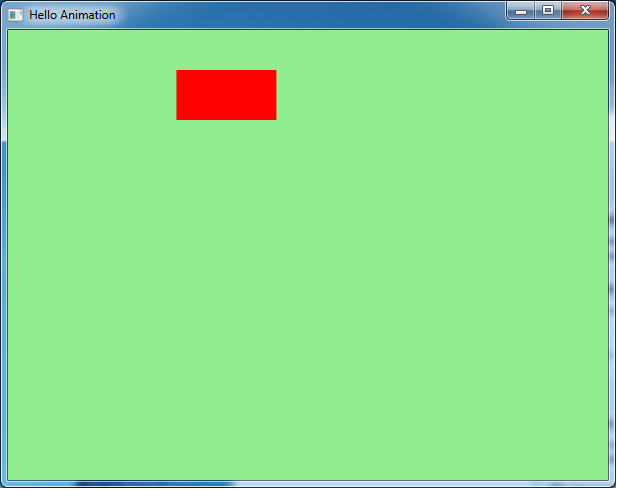
This example demonstrates simple animation: A rectangle that moves
smoothly left to right and back again continuously.
This is example is converted from HelloAnimation.java written in Java by Kevin Rushforth. Here is the entire program HelloAnimation.scm:
(require 'javafx-defs)
(javafx-application)

(define rect
  (Rectangle
   x: 25  y: 40  width: 100  height: 50
   fill: Color:RED))

(javafx-scene
 title: "Hello Animation"
 width: 600 height: 450  fill: Color:LIGHTGREEN
 rect)

((Timeline
  cycle-count: Timeline:INDEFINITE
  auto-reverse: #t
  (KeyFrame
   (Duration:millis 500)
   (KeyValue (rect:xProperty) 200))):play)
The first two lines are boilerplate, as in JavaFX-using-Kawa-intro.
The (define rect (Rectange ...)) defines a variable
rect, and initializes it to a new Rectangle,
using an object constructor as seen before.
The (javafx-scene ...) operations creates the scene with
the specified title, width, height
and fill (background color) properties.
It adds the rect to the scene, and then creates a window to make it visible.
Finally, we animate rect. This requires some background explanation.
Key values and key frames
To animate a scene you create a TimeLine data structure,
which describes what properties to modify and when to do so.
Once you have done so, call play on the TimeLine,
which instructs JavaFX's animation engine to start running the animation.
In this example, the animation continuous indefinitely:
When done, it reverses (because auto-reverse was set to true)
and starts over.
The timeline is divided into a fixed number of
key frames,
which are associated with a specific point in time.
In the current example there is the implicit starting key-frame
at time 0, and an explicit key-frame at time 500 (milliseconds).
(The KeyFrame specifies a duration or ending time,
where the start time is the ending time of the previous key-frame,
or 0 in the case of the first key-frame.)
The animator (or programmer) specifies various properties (such
as positions and sizes of objects) at each key-frame, and then the
computer smoothly interpolates between the key-frames.
By default the interpolation is linear, but you can specify other
kinds of interpolation.
Each KeyFrame consists of some KeyValue objects.
A KeyValue species which property to modify
and the ending value that the property will have at the end of the key-frame.
In the example, we have a single KeyValue to modify
rect:x, ending at 200. (The start value is 25, as set when
rect was constructed.)
In JavaFX, the properties to animate are specified using
Property objects. Typeically, a property is a reference
to a specific field in a specific object instance. You register the
property with the animation engine (as shown in the sample), and then
the animation engine uses the property to modify the field.
In the example the expression (rect:xProperty)
(equivalent to the Java method call rect.xProperty())
returns a property that references the x property
of the rect object.
The Property object also has ways to register dependencies
(rather like change listeners) so that things get updated
when the property is changed. (For example the rectangle is re-drawn
when its x property changes.)
Here is a static screenshot - obviously an animiated gif would be nicer here!
More information
ToDo: Links to documentation and other JavaFX examples.JavaFX 1.0 was a next-generation GUI/client platform. It had a new Node-based GUI API and used a new language, JavaFX Script, whose goal was to make it easier to program Rich Client applications. (Yours truly was hired by Sun to work on the JavaFX Script compiler.) In 2010 the JavaFX Script language was cancelled: JavaFX would still refer to a new GUI based API based on many of the same concepts, but the primary programming language would be Java, rather than JavaFX Script.
Java is a relatively low-level and clumsy language for writing Rich Client appliations, though it's not too painful. Still, there was a reason we worked on JavaFX Script: It had a number of features to make such programs more convenient. Luckily, other JVM languages - and specifically Kawa-Scheme - can take up the slack. Below I'll show you a simple Hello-World-type example, and then explain how you can try it yourself. In later acticles I'll show different examples.
Simple buttons and events
Our first example is just 3 buttons and 2 trivial event handlers. It is translated from HelloButton.java written in Java by Richard Bair.
(require 'javafx-defs)
(javafx-application)

(javafx-scene
 title: "Hello Button"
 width: 600 height: 450
 (Button
  text: "Click Me"
  layout-x: 25
  layout-y: 40
  on-action: (lambda (e) (format #t "Event: ~s~%" e))
  on-key-released: (lambda (e) (format #t "Event: ~s~%" e)))
 (Button
  text: "Click Me Too"
  layout-x: 25
  layout-y: 70)
 (Button
  text: "Click Me Three"
  layout-x: 25
  layout-y: 100))
For those new to Scheme, the basic syntactic building block has the form:
(operator argument1 ... argumentN)The
operator can be a function (like format),
an arithmetic operator in prefix form (like (+ 3 4)),
a command, a keyword (like lambda), or a user-defined macro.
This general format makes for a lot of flexibility.
The first two lines in HelloButton.scm are boiler-plate:
The require imports various definitions and aliases,
while the (javafx-application) syntax declares
this module is a JavaFX Application.
The javafx-scene form (a macro) creates a scene,
which is a collection of graphical objects.
The Scene has certain named properties (title,
width, and height), specified using keyword arguments. The Scene also has 3 Button children.
Finally, the make-scene command puts the scene
on the stage (the window) and makes it visible.
Each Button form is an object constructor. For example:
(Button
 text: "Click Me Three"
 layout-x: 25
 layout-y: 100)
is equivalent to the Java code:
javafx.scene.control.Button tmp = new javafx.scene.control.Button();
tmp.setText("Click Me Three");
tmp.setLayoutX(25);
tmp.setLayoutY(100);
return tmp;
The on-action and on-key-released
properties on the first Button bind event handlers.
Each handler is a lambda expression or anonymous function that takes an event e as a parameter. The Kawa compiler converts the handler to a suitable
event handler object using
SAM-conversion features
.
(This conversion depends on the context, so if you don't have a
literal lambda expression you have to do the conversion by hand
using an object operator.)
Getting it to run
Downloading JavaFX 2.x beta
For now JavaFX is only available for Windows, but Mac and GNU/Linux ports are being worked on and mostly work. (I primarily use Fedora Linux.) The primary JavaFX site has lots of information, including a link to the download site. You will need to register, as long the software is beta. Download the zipfile and extract it to some suitable location.
In the following, we assume the variable JAVAFX_HOME
is set to the build you've installed. For example (if using plain Windows):
set JAVAFX_HOME=c:\javafx-sdk2.0-betaThe file
%JAVAFX_HOME%\rt\lib\jfxrt.jar should exist.
Downloading and building Kawa
The JavaFX support in Kawa is new and experimental (and unstable), so for now you will have to get the Kawa source code from SVN.
There are two ways to build Kawa. The easiest is to use Ant - on plain Windows do:
ant -Djavafx.home=%JAVAFX_HOME%or on other platforms (including Cygwin):
ant -Djavafx.home=$JAVAFX_HOME
Alternatively, you can use configure and make
(but note that on Windows you will need to have Cygwin installed to use this approach):
$ KAWA_DIR=path_to_Kawa_sources
$ cd $KAWA_DIR
$ ./configure --with-javafx=$JAVAFX_HOME
$ make
Running the example
On Windows, the easiest way to run the example is to use the
kawa.bat created when building Kawa. It sets up
the necessary paths for you.
%KAWA_HOME%\bin\kawa.bat HelloButton.scm
On Cygwin (or Unix/Linux) you can use the similar kawa.sh.
I suggest setting your PATH to find
kawa.bat or kawa.sh, so you can just do:
kawa HelloButton.scm
Using the kawa command is equivalent to
java -classpath classpath kawa.repl HelloButton.scmbut it sets the classpath automatically. If you do it by hand you need to include
%JAVAFX_HOME%\rt\lib\jfxrt.jar
and %KAWA_DIR%\kawa-version.jar.
This is what pops up:
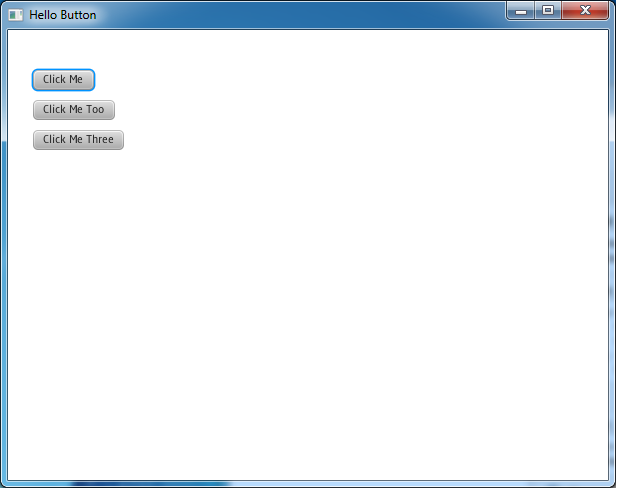
If you click the first button the action event fires, and
you should see something like:
Event: javafx.event.ActionEvent[source=Button@3a5794[styleClass=button]]
If you type a key (say n) while that button has focus
(e.g. after clicking it),
then when you release the key a key-released event fires:
Event: KeyEvent [source = Button@3a5794[styleClass=button],
target = Button@3a5794[styleClass=button], eventType = KEY_RELEASED,
consumed = false, character = , text = n, code = N]
Note: Running a JavaFX application from the Kawa read-eval-print-loop (REPL) doesn't work very well at this point, but I'm exploring ideas to make it useful.
Compiling the example
You can compile HelloButton.scm to class files:
kawa --main -C HelloButton.scm
You can execute the resulting application in the usual way:
java -classpath classpath HelloButtonor use the
kawa command:
kawa HelloButton
Next
JavaFX-using-Kawa-animation(This has been updated here.)
Google's phone operating system "Android" is based on a custom Java virtual machine on top of GNU/Linux. So it occurred to me: How difficult would it be to get a Kawa application running on Android? Not that difficult, it turns out.
Here is "Hello world" written in Kawa Scheme:
(module-extends android.app.Activity)
(module-name kawa.android.hello)
(define (onCreate (savedInstanceState :: android.os.Bundle)) :: void
  (invoke-special android.app.Activity (this) 'onCreate savedInstanceState)
  (let ((tv :: android.widget.TextView (make android.widget.TextView (this))))
    (tv:setText "Hello, Android from Kawa Scheme!")
    ((this):setContentView tv)))
It's got some annoying boiler-plate, though it's similar to the Java version; hopefully we can simplify later.
Here is how to get this program running on the Android emulator on GNU/Linux. (I haven't yet figured out how to get it working on the actual phone.) This article Android Phone development from the Linux command-line was helpful in figuring out what to do.
First you need to download the Android SDK. Unzip, in a suitable location,
which we'll refer to as ANDROID_HOME:
ANDROID_HOME=/path/to/android-sdk-linux_x86-1.0_r2
PATH=$ANDROID_HOME/tools:$PATH
To get this to work I had to make some modest changes to Kawa, so you will need to get the Kawa developer sources from SVN.
You need to configure and make Kawa appropriately:
KAWA_DIR=path_to_Kawa_sources
cd $KAWA_DIR
./configure --with-android=$ANDROID_HOME/android.jar
make
Next, we need to create a project or activity,
in the target directory KawaHello,
with the main activity
being a class named hello
in a package kawa.android:
activitycreator --out KawaHello kawa.android.hello
Replace the skeleton hello.java by the
Scheme code we started out with:
cd KawaHello
HELLO_APP_DIR=`pwd`
cd $HELLO_APP_DIR/src/kawa/android/
rm hello.java
emacs hello.scm
We need to copy/link the Kawa jar file so the Android SDK can find it:
cd $HELLO_APP_DIR
ln -s $KAWA_DIR/kawa-1.9.3.jar libs/kawa.jar
We also need to modify the Ant build.xml
so it knows how to compile Scheme code:
patch < build-xml.patch
Finally, we can compile our application:
ant
Next start up the Android emulator:
emulator&
Wait until Android has finished booting, clisk the menu and home buttons. Click the tab above the menu key to show the installed applications. Now install our new application:
adb install bin/hello-debug.apk
The new hello application should show up.
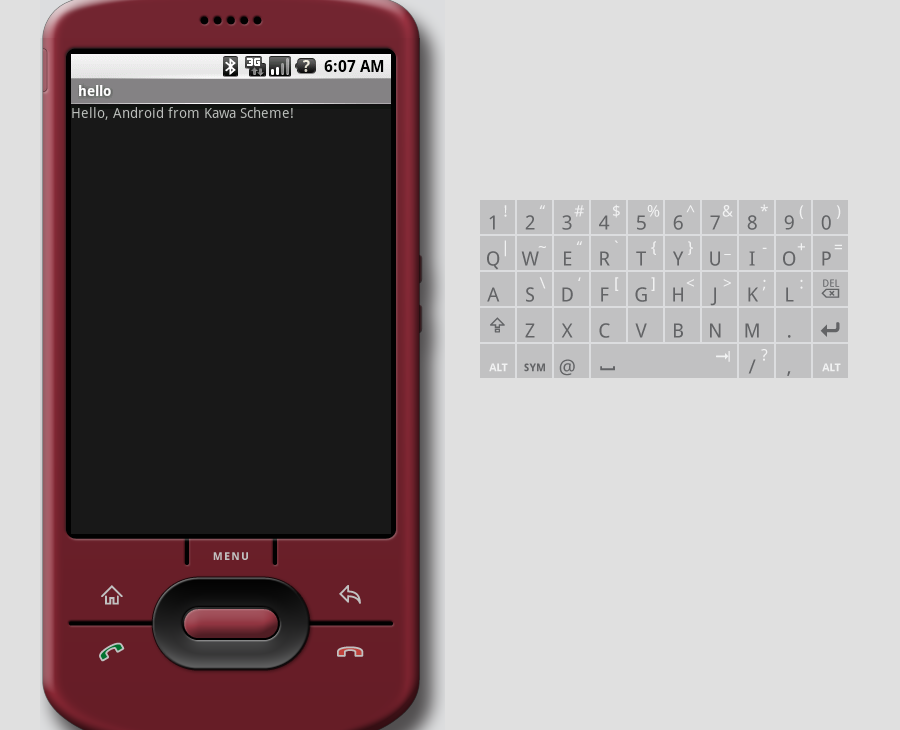
Click it, and you should see something like:
Some debugging notes
You will find a copy of the SDK documentation in
$ANDROID_HOME/docs/documentation.html.
If the emulator complains that your application
has stopped unexpectedly
, start ddms
(Dalvik Debug Monitor Service), click on the kawa.android
line in the top-left sub-window to select it, then from the
Device menu select Run logcat....
This shows log messages, stack traces, output from the Log.i
loggin method, and other useful information.
To uninstall your application, do:
adb uninstall kawa.android
(This is an update of the 2009 version, which was an update of the original 2008 version.)
Google's phone operating system "Android" is based on a custom Java virtual machine on top of GNU/Linux. So it occurred to me: How difficult would it be to get a Kawa application running on Android? Not that difficult, it turns out.
Here is "Hello world" written in Kawa Scheme:
(require 'android-defs)
(activity hello
  (on-create-view
   (android.widget.TextView (this)
    text: "Hello, Android from Kawa Scheme!")))
(A more interesting
text-to-speech example app is on
Santosh Rajan's Android-Scheme blog.)
The following instructions have been tested on GNU/Linux, specifically Fedora 13, but if you've managed to build Android applications under (say) Windows, you should be able to appropriately modify these instructions.
Getting and building Kawa and Android
First download the Android SDK. Unzip in a suitable location,
which we'll refer to as ANDROID_HOME.
$ export ANDROID_HOME=/path/to/android-sdk-linux_86
$ PATH=$ANDROID_HOME/tools:$PATH
Next you have to get the appropriate platform SDK:
$ android update sdkSelect
SDK Platform Android 2.2 or whatever
and click Install.
You need to select an Android platform
.
Platform 8 corresponds to Android 2.2 (Froyo).
ANDROID_PLATFORM=android-8
You need to get the Kawa source code (version 1.11 or later).
Set JAVA_HOME to where your JDK tree is, for example:
$ export JAVA_HOME=/opt/jdk/1.6.0
If using Ant (as is recommended on Windows):
$ ant -Denable-android=true
Alternatively, you can use configure and make:
$ KAWA_DIR=path_to_Kawa_sources
$ cd $KAWA_DIR
$ ./configure --with-android=$ANDROID_HOME/platforms/$ANDROID_PLATFORM/android.jar --disable-xquery --disable-jemacs
$ make
Creating the application
Next, we need to create a project or activity
,
in the target directory KawaHello,
with the main activity being a class named hello
in a package kawa.android:
$ android create project --target $ANDROID_PLATFORM --name KawaHello --activity hello --path ./KawaHello --package kawa.android
Replace the skeleton hello.java by the
Scheme code at the top of this note:
$ cd KawaHello
$ HELLO_APP_DIR=`pwd`
$ cd $HELLO_APP_DIR/src/kawa/android/
$ rm hello.java
$ emacs hello.scm
We need to copy/link the Kawa jar file so the Android SDK can find it:
$ cd $HELLO_APP_DIR
$ ln -s $KAWA_DIR/kawa-1.10.jar libs/kawa.jar
Optionally, you can use kawart-1.10.jar, which is
slightly smaller, but does not support eval,
and does not get built by the Ant build:
$ ln -s $KAWA_DIR/kawart-1.10.jar libs/kawa.jar
We also need to modify the Ant build.xml
so it knows how to compile Scheme code:
$ patch < build-xml-patch.txt
Finally, we can build our application:
$ ant debug
Running the application on the Android emulator
First you need to
create an Android Virtual Device (avd).
Start:
androidthen select
Virtual Devices, then click New....
Pick a Name (we use avd8 in the following),
a Target (to match $ANDROID_PLATFORM),
and optionally change the other properties, before clicking Create AVD.
Start up the Android emulator:
$ emulator -avd avd8 &
Wait until Android has finished booting (you will see the Android home screen), click the menu and home buttons. Now install our new application:
adb install bin/KawaHello-debug.apk
The new hello application should show up.
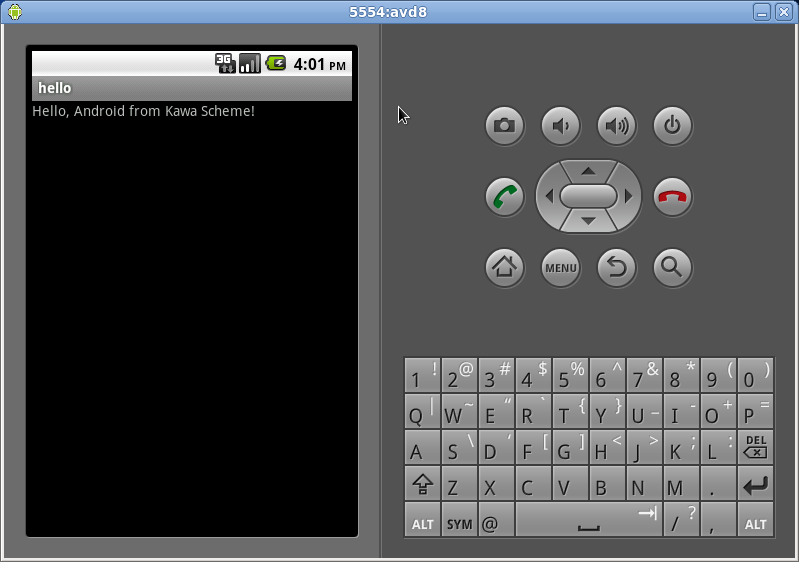
Click it, and you should see something like:
Running the application on your phone
If the emulator is running, kill it:
$ kill %emulator
On the phone, enable USB debugging. (This is settable from the
Settings application, under Applications / Development.)
Connect the phone to your computer with the USB cable.
Verify that the phone is accessible to adb:
$ adb devices
List of devices attached
0A3A560F0C015024	device
If you don't see a device listed, it may be permission problem. You can figure out which device corresponds to the phone by doing:
$ ls -l /dev/bus/usb/*
/dev/bus/usb/001:
total 0
...
crw-rw-rw- 1 root wheel 189, 5 2010-10-18 16:52 006
...
The timestamp corresponds to when you connected the phone. Make it readable:
$ sudo chmod a+w /dev/bus/usb/001/006
Obviously if you spend time developing for an Androd phone you'll want to automate this process; this link or this link may be helpful.
Anyway, once adb can talk to the phone, you
install in the same way as before:
adb install bin/KawaHello-debug.apk
Some debugging notes
You will find a copy of the SDK documentation in
$ANDROID_HOME/docs/index.html.
If the emulator complains that your application
has stopped unexpectedly
, do:
$ adb logcat
This shows log messages, stack traces, output from the Log.i
logging method, and other useful information.
(You can alternatively start ddms
(Dalvik Debug Monitor Service), click on the kawa.android
line in the top-left sub-window to select it, then from the
Device menu select Run logcat....)
To uninstall your application, do:
$ adb uninstall kawa.android
(Here is the latest version. This is in turn an update of the original version.)
Google's phone operating system "Android" is based on a custom Java virtual machine on top of GNU/Linux. So it occurred to me: How difficult would it be to get a Kawa application running on Android? Not that difficult, it turns out.
Here is "Hello world" written in Kawa Scheme:
(require 'android-defs)
(activity hello
  (on-create-view
   (let ((tv (android.widget.TextView (this))))
     (tv:setText "Hello, Android from Kawa Scheme!")
     tv)))
The following instructions have been tested on GNU/Linux, specifically Fedora 10, but if you've managed to build Android applications under (say) Windows, you should be able to appropriately modify these instructions. The article Android Phone development from the Linux command-line helped me figure out what to do.
Getting and building Kawa and Android
First download the Android SDK. Unzip in a suitable location,
which we'll refer to as ANDROID_HOME.
$ ANDROID_HOME=/path/to/android-sdk-linux_x86-1.0_r2
$ PATH=$ANDROID_HOME/tools:$PATH
To get things to work I had to make some modest changes to Kawa, so you will need to get the Kawa developer sources from SVN.
You need to configure and make Kawa appropriately:
$ KAWA_DIR=path_to_Kawa_sources
$ cd $KAWA_DIR
$ ./configure --with-android=$ANDROID_HOME/android.jar --disable-xquery
$ make
Creating the application
Next, we need to create a project or activity,
in the target directory KawaHello,
with the main activity
being a class named hello
in a package kawa.android:
$ activitycreator --out KawaHello kawa.android.hello
Replace the skeleton hello.java by the
Scheme code at the top of this note:
$ cd KawaHello
$ HELLO_APP_DIR=`pwd`
$ cd $HELLO_APP_DIR/src/kawa/android/
$ rm hello.java
$ emacs hello.scm
We need to copy/link the Kawa jar file so the Android SDK can find it:
$ cd $HELLO_APP_DIR
$ ln -s $KAWA_DIR/kawa-1.9.3.jar libs/kawa.jar
We also need to modify the Ant build.xml
so it knows how to compile Scheme code:
$ patch < build-xml-patch.txt
Finally, we can compile our application:
$ ant
Running the application on the Android emulator
Start up the Android emulator:
$ emulator&
Wait until Android has finished booting, clisk the menu and home buttons. Click the tab above the menu key to show the installed applications. Now install our new application:
adb install bin/hello-debug.apk
The new hello application should show up.
Click it, and you should see something like:
Running the application on the G1 phone
If the emulator is running, kill it:
$ kill %emulator
Connect the phone to your computer with the USB cable.
Verify that the phone is accessible to adb:
$ adb devices
List of devices attached
HT849GZ17337	device
If you don't see a device listed, it may be permission problem. You can figure out which device corresponds to the phone by doing:
$ ls -l /dev/bus/usb/*
/dev/bus/usb/001:
total 0
...
crw-rw-rw- 1 root wheel 189, 5 2009-01-18 16:52 006
...
The timestamp corresponds to when you connected the phone. Make it readable:
$ sudo chmod a+w /dev/bus/usb/001/006
Obviously if you spend time developing for an Androd phone you'll want to automate this process; this link or this link may be helpful.
Anyway, once adb can talk to the phone, you
install in the same way as before:
adb install bin/hello-debug.apk
Some debugging notes
You will find a copy of the SDK documentation in
$ANDROID_HOME/docs/documentation.html.
If the emulator complains that your application
has stopped unexpectedly
, do:
$ adb logcat
This shows log messages, stack traces, output from the Log.i
logging method, and other useful information.
(You can alternatively start ddms
(Dalvik Debug Monitor Service), click on the kawa.android
line in the top-left sub-window to select it, then from the
Device menu select Run logcat....)
To uninstall your application, do:
$ adb uninstall kawa.android
printed(serialized) as XML documents. Kawa recently gained support for annotations, so let us look at an example. You will need Java 6 for the JAXB 2.0 support, and Kawa from SVN (or Kawa 1.12 when it comes out). Nothing else is needed.
Our example is a simple bibliography database of books and some information
about them.
The DTD
and sample input data
are taken from the XML Query Use Cases. The complete example is in the
file testuite/jaxb-annotations3.scm
in the Kawa source distribution.
Defining the Java classes and their XML mapping
We start with somedefine-alias declarations, which serve
the role of Java's import:
(define-alias JAXBContext javax.xml.bind.JAXBContext)
(define-alias StringReader java.io.StringReader)
(define-alias XmlRegistry javax.xml.bind.annotation.XmlRegistry)
(define-alias XmlRootElement javax.xml.bind.annotation.XmlRootElement)
(define-alias XmlElement javax.xml.bind.annotation.XmlElement)
(define-alias XmlAttribute javax.xml.bind.annotation.XmlAttribute)
(define-alias BigDecimal java.math.BigDecimal)
(define-alias ArrayList java.util.ArrayList)
The bibliography is represented by a Java singleton class
Bib,
which has a books field, which is
an ArrayList collection of Book objects:
(define-simple-class Bib ( ) (@XmlRootElement name: "bib")
  (books (@XmlElement name: "book" type: Book) ::ArrayList))
The XmlRootElement annotation says that the Bib
is represented in XML as a root element (document element)
named <bib>. Each Book is represented
using a <book> element.
Note the annotation value name: "book" is needed
because I decided to use the plural books for the
field name (because it is an List), but the singular
book for the tag name for each book element.
Each book is represented using the class Book,
which has the fields year, title,
publisher (all strings),
authors and editors (both ArrayLists),
and price (a BigDecimal).
Note that the while the other fields get mapped to XML child elements,
the year is mapped to an XML attribute,
also named year.
(define-simple-class Book ()
  (year (@XmlAttribute required: #t) ::String)
  (title (@XmlElement) ::String)
  (authors (@XmlElement name: "author" type: Author) ::ArrayList)
  (editors (@XmlElement name: "editor" type: Editor) ::ArrayList)
  (publisher (@XmlElement) ::String)
  (price (@XmlElement) ::BigDecimal))
Finally, the Author and Editor classes,
both of which inherit from Person:
(define-simple-class Person ()
  (last (@XmlElement) ::String)
  (first (@XmlElement) ::String))

(define-simple-class Author (Person))

(define-simple-class Editor (Person)
  (affiliation (@XmlElement) ::String))
Setting up the JAXB context
Next we need to specify a JAXBContext, which manages the
mapping between Java classes and the XML document schema (structure).
Once JAXB knows the classes involved, it can figure out the XML representation
by analyzing the classes and their annotations (using reflection).
A simple way to do this is to just list the needed classes
when creating the JAXBContext:
(define jaxb-context ::JAXBContext
  (JAXBContext:newInstance Bib Book Person Editor))
(Actually, you don't need to list all the classes: if you just
list the root class Bib, JAXB can figure out the rest.)
An alternative is to make use of an ObjectFactory.
Specifically, if the element classes are in a package named my.package
then you need to create a class ObjectFactory (in the same
package), and specify the package name to the JAXBContext factory method newInstance. The ObjectFactory class
needs to have a factory method for at least the root class Bib:
(define jaxb-context ::JAXBContext
  (JAXBContext:newInstance "my.package"))
(define-simple-class ObjectFactory () (@XmlRegistry)
  ((createBib) ::Bib (Bib)))
Unmarshalling - reading XML and creating objects
At this point actually parsing the XML and creating objects
is trivial. You create an
Unmarshaller from the JAXBContext,
and then just invoke one of the Unmarshaller
unmarshall methods.
(define (parse-xml (in ::java.io.Reader)) ::Bib
  ((jaxb-context:createUnmarshaller):unmarshal in))
(define bb (parse-xml (current-input-port)))
Update the values
The whole point of unmarshalling the XML is
presumably so you can do something with the data.
First, an example of modifying existing records
:
let's deal with inflation and increase all the prices by 10%:
;; Multiply the price of all the books in bb by ratio.
(define (adjust-prices (bb::Bib) (ratio::double))
  (let* ((books bb:books)
         (nbooks (books:size)))
    (do ((i :: int 0 (+ i 1))) ((>= i nbooks))
      (let* ((book ::Book (books i)))
        (set! book:price (adjust-price book:price ratio))))))

;; Multiply old by ratio to yield an updated 2-decimal-digit BigDecimal.
(define (adjust-price old::BigDecimal ratio::double)::BigDecimal
  (BigDecimal (round (* (old:doubleValue) ratio 100)) 2))

(adjust-prices bb 1.1)
Next, let's add a new book:
(bb:books:add
 (Book year: "2006"
       title: "JavaScript: The Definitive Guide (5th edtion)"
       authors: [(Author last: "Flanagan" first: "David")]
       publisher: "O'Reilly"
       price: (BigDecimal "49.99")))
Notice the use of square brackets (a new Kawa feature)
for the authors single-element sequence.
Marshalling - writing XML from objects
Finally, we might want to write the updated data out to an
XML file. For that we create a
Marshaller. It has a number of marshall
methods that take a jaxbElement
and a target specification,
and serializes the former to the latter as XML. For example, you could
just pass in a File to specify the name of the XML output file.
However, Kawa includes an XML pretty-printer, and it would be nice
to have pretty-printed and indented XML. To do that we have to use
a SAX2 ContentHandler as the bridge between JAXB and
Kawa's XML tools. The Kawa XMLFilter implements
ContentHandler and can forward XML-like data to an
XMLPrinter. The latter doesn't do pretty-printing by default -
you have to set the *print-xml-indent* fluid variable
to the symbol 'pretty.
;; Write bb as pretty-printed XML to an output port.
(define (write-bib (bb ::Bib) (out ::output-port))::void
  (let ((m (jaxb-context:createMarshaller)))
    (fluid-let ((*print-xml-indent* 'pretty))
      ;; We could marshal directly to 'out' (which extends java.io.Writer).
      ;; However, XMLPrinter can pretty-print the output more readably.
      ;; We use XMLFilter as glue that implements org.xml.sax.ContentHandler.
      (m:marshal bb (gnu.xml.XMLFilter (gnu.xml.XMLPrinter out))))))

(write-bib bb (current-output-port))
ftp://ftp.gnu.org/pub/gnu/kawa/kawa-1.11.tar.gz (source code)
ftp://ftp.gnu.org/pub/gnu/kawa/kawa-1.11.jar (runnablejar)
For a full list of changes, see the news page. Below are some highlights.
Improved object initialization
When constructing an object and there is no matching
constructor method, look for "add" methods in addition
to "set" methods. Also, allow passing constructor args
as well as keyword setters.
These features make it more convenient to allocate and initialize
complex objects.
See here for details and examples, including a simple but complete Swing application.
SAM-conversion
In a context that expects a Single Abstract Method (SAM) type (for
example java.lang.Runnable), if you pass a lambda you will get an
object where the lambda implements the abstract method. For example,
you can just write:
(button:addActionListener
  (lambda (e) (do-something)))
instead of the equivalent but more long-winded:
(button:addActionListener
  (object (java.awt.event.ActionListener)
    ((actionPerformed (e ::java.awt.event.ActionEvent))::void
     (do-something))))
See here for more information.
Enumerations
A new define-enum form, contributed by Jamison Hope,
makes it easy to define enuration types and values compatible with Java5 enums.
(define-enum colors (red blue green))For more details and examples, see here.
New Kawa logo
Kawa new has a logo contributed by Jakub Jankiewicz: